What Makes a Good First Agent Use Case
The most common thing I hear when organizations start talking about AI agents is some version of this: we know we should be doing something here, but we do not know where to start.
Candidly, that is a reasonable place to be.
Most leadership teams are not struggling with whether AI matters. They are struggling with fit. They are trying to separate real business value from generic excitement. They are trying to understand what is practical in their current environment, what will require more structure, and what is worth funding now versus later.
That is usually where the conversation gets more useful.
In most mid-market environments, the right starting point is not a sweeping reinvention of the business. It is a single practical use case with a defined scope, a clear owner, and measurable outcomes. In our experience, the answer usually comes back to one of five places. These are not abstract ideas, and they are not only for organizations with dedicated AI teams and a multi-year roadmap. These are grounded use cases for teams already working in Microsoft 365, Power Platform, Dynamics 365, or some mix of the three.
We have built all five. Two already run in our own environment.
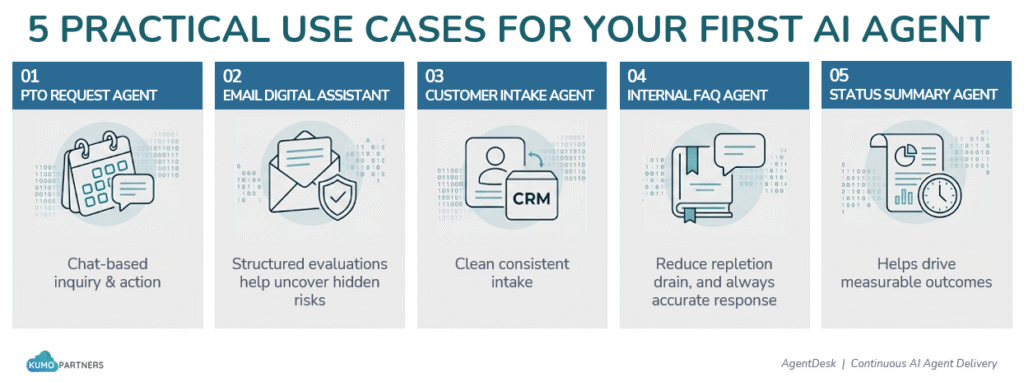
1. PTO Request Agent
The problem
PTO sounds like a simple process until people actually need to use it.
Employees want to know how much PTO they have, how much they have already used, what time off is already approved, and whether a new request can be submitted. Managers need enough context to approve or decline the request without digging through separate systems. HR needs the process to run consistently without becoming the middle layer for every status check.
The issue is usually not that the data does not exist. The issue is that the employee experience is fragmented. The balance may live in one place, the request process may live somewhere else, and the approval status may depend on someone following up manually.
What the agent does
A PTO agent gives employees a chat-based way to ask questions about their time off and take action from the same interface.
An employee can ask how much PTO they have available, how much they have used, and what upcoming PTO has already been approved. If they want to request time off, the agent can walk them through the request, capture the right details, send it through the approval process, and notify the employee once a decision has been made.
That matters because the value is not just answering a PTO balance question faster. The value is turning a small HR process into something structured, trackable, and easier for both employees and managers to use.
What makes it work
The important part is the difference between a form with a flow behind it and an actual agent experience.
A form can collect fields. A flow can send a request. But the agent can have a conversation, understand what the employee is trying to do, check the available information, and explain what is happening if something does not go as expected.
Candidly, that is where a lot of these use cases become more interesting. The goal is not to make AI approve PTO on its own. The goal is to simplify the experience, reduce manual follow-up, and give people a clearer answer than a generic error message when the process needs attention.
What the environment needs
This fits well in a Microsoft environment where the PTO data is stored in SharePoint or Dataverse, Copilot Studio provides the agent experience, and Power Automate handles the approval routing, notifications, and status updates.
The cleaner the PTO data and approval rules are, the better this works. If the process is already mostly defined, the agent can help make it easier to use.
2. Email Digital Assistant
The problem
A lot of executive and customer-facing email work looks simple from the outside. Someone reads the message, understands the ask, determines the risk, and drafts a response.
But that is exactly why it is hard to automate.
Every email is a little different. The tone shifts depending on the sender. The urgency is not always obvious. The risk may be hiding in a small phrase, a financial detail, a legal implication, or a request that should not be answered too casually.
On paper, the process may look like it is working. Emails are getting drafted. Responses are going out. But when leadership reviews them, something can still feel off. The tone may not match. The intent may not be fully aligned. The response may move too quickly on something that needed more care.
What the agent does
An email digital assistant helps evaluate incoming emails, identify what kind of response is needed, and generate a controlled draft for review.
The system can look at an incoming email, summarize it, classify the intent, identify urgency, flag sensitivity, and determine whether a response should be drafted at all. If the email meets the right criteria, it creates a draft response in Outlook for the executive or user to review and send.
The real value is not that AI writes an email. That is the easy framing, and it is usually too shallow.
The real value is that the process becomes structured. The assistant can separate emails that need no response from emails that need acknowledgment, escalation, or a more careful draft. It gives the user a stronger starting point without asking them to trust AI blindly.
What makes it work
This use case works because it treats AI as part of a controlled system, not just a blank text box.
The assistant is built around guardrails. It filters out emails that do not need a response, validates whether there is a real ask, checks for sensitive categories like legal, financial, or approval-related content, and only drafts when the conditions are right.
That structure matters. If the assistant just generated a paragraph every time, it would create noise and risk. Instead, the system returns structured outputs like summary, intent, urgency, sensitivity, and draft response so the workflow can act on that information consistently.
My concern in these cases is usually not whether AI can generate decent text. It can. The harder question is whether the system knows when not to generate text.
That is where the guardrails matter.
What the environment needs
A strong version of this usually relies on Outlook as the email surface, Power Automate for the event-driven workflow, and AI Builder or Azure OpenAI for prompt-driven classification and draft generation.
The key is structured output. Instead of relying on open-ended responses, the system should return clear fields that downstream logic can use. That makes it easier to measure, refine, and govern over time.
This is also why Copilot is not always the right fit for this kind of use case. Copilot is helpful when a person wants to interact with AI in the moment. This pattern is different. It puts AI inside the workflow, where it can be triggered automatically, follow defined rules, and create outputs the rest of the system can act on.
3. Customer Intake Agent
The problem
Inbound requests often require manual triage. Someone has to read the inquiry, decide whether it is qualified, create the CRM record, route it to the right seller or team, and send the first response. That may not sound like much, but it adds delay, inconsistency, and unnecessary handoffs right at the beginning of the customer relationship.
That first interaction matters. If the intake process is slow or uneven, it creates friction before a real conversation has even started.
What the agent does
A customer intake agent handles that first layer of qualification. It asks the questions your sales process requires, structures the data, creates the lead or contact in Dynamics 365, routes it to the right queue or owner, and can send the initial response automatically.
That does not mean every lead should be fully automated. It depends on what you are looking for. In some environments, the agent should complete the intake and pass the result to a person for review. In others, it can handle the full front-end motion cleanly.
What makes it work
This works best when qualification criteria are already defined. If your team knows what information matters at intake, the agent can gather it. If qualification is still subjective or inconsistent across the business, start with the intake structure first and keep a human review step in place.
That is often the smarter path anyway.
What the environment needs
This usually connects Dynamics 365, Power Automate, and Copilot Studio, either in a tenant-based deployment or through Teams depending on how the business wants to manage access and adoption.
4. Internal FAQ Agent
The problem
IT, HR, finance, and operations teams answer the same internal questions every week. Travel policy. Expense handling. password resets. Equipment requests. Process steps. The answers do not change very often, but the volume does.
This is one of the easiest places to see whether an agent is delivering practical value, because the time drain is visible almost immediately.
What the agent does
An internal FAQ agent answers common questions from a maintained knowledge base and escalates only the cases that need human judgment. Done well, it reduces repetitive interruption while still keeping control over what the agent is allowed to answer.
This is also one of the best ways to improve adoption. People are more likely to trust the broader idea of agents when the first experience is simple, useful, and clearly grounded in approved information.
What makes it work
This is not set-and-forget. Someone needs to own the content. Policies change. Procedures change. If the business already has some discipline around documentation and governance, that is a strong sign this use case will hold up well.
If it does not, that is worth fixing before scaling further.
What the environment needs
This typically runs well with SharePoint or Dataverse as the source, Copilot Studio as the agent layer, and Teams as the front-end access point for employees.
5. Weekly Status Summary Agent
The problem
A lot of weekly reporting is still manual. Someone pulls numbers from multiple systems, reformats them, builds the same summary, and sends it out on a schedule. It may only take 30 to 45 minutes each week, but it is the same work over and over, and it usually sits with someone whose time is better spent elsewhere.
For leadership, this is one of those use cases that seems small until you add up the repetition, inconsistency, and dependency risk.
What the agent does
A weekly status summary agent pulls the agreed data from the systems you define, structures it into the reporting format you already use, and distributes it to the right audience on the right cadence.
That can mean a simple operational summary. It can also mean a more structured internal report that combines data, commentary prompts, and a scheduled distribution flow.
What makes it work
Stable inputs and a stable format. If the reporting logic changes every week, the build becomes harder to maintain. If the report has been largely the same for the last year, this is often a very strong candidate.
Let’s keep this simple. The more repeatable the work, the better the fit.
What the environment needs
This often uses Dataverse or SQL for structured data, Power Automate for orchestration and scheduling, and sometimes Power BI if the reporting output includes visuals or published dashboards.
Where to Start
The best starting use case usually combines two things: a defined scope and clear business value.
That sounds obvious, but it matters. A well-scoped onboarding or FAQ agent will often produce a better first result than a more ambitious approval model with unclear business rules. Maturity matters. Governance matters. Clarity matters.
This is also why many organizations benefit from a model like Agent Desk rather than approaching every agent as a custom consulting exercise from day one. Not every use case has the same complexity. Some can be built quickly because the process is already defined and the data is in decent shape. Others require more structure, more validation, and more managed operations behind the scenes.
That difference should show up in how the work is framed and how it is funded.
A credit-based model tied to complexity gives leadership a more practical way to start. It creates a roadmap instead of a one-off experiment. It helps you prioritize the highest-fit use cases first, understand what belongs in a lighter build versus a more involved one, and scale based on measurable outcomes rather than hype.
Which of These Is Already in Your Backlog?
Most organizations already have some version of one of these use cases sitting on a list somewhere. The challenge is usually not idea generation. The challenge is choosing the right first build, validating environmental fit, and structuring the work in a way the business can actually operationalize.
That is the goal here.
If you start with the right use case, the path gets clearer quickly. You learn where your documentation is strong, where your processes need more definition, how your teams respond, and what real adoption looks like in your environment. From there, the roadmap becomes much easier to defend.
At the end of the day, the best agent strategy is usually not the most ambitious one. It is the one that is grounded enough to ship, measured enough to prove value, and structured enough to scale.
0 Comments