Automation and Agents Are Not the Same Thing
Most people use the words “AI agent” and “automation” as if they mean the same thing.
They do not.
That distinction matters when you are trying to put something into production that actually works.
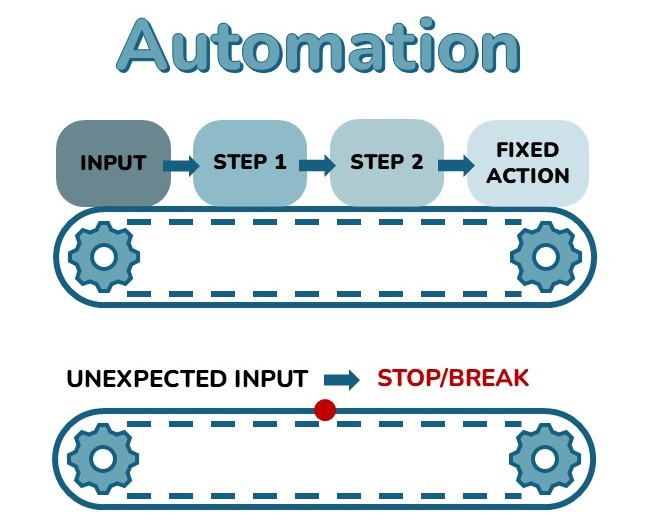
An automation follows a fixed path. You define the steps, and it executes them in order. When something falls outside those steps, such as an unexpected input, a missing field, or a condition the designer did not account for, it stops. An automation is only as strong as the scenarios someone mapped ahead of time.
An agent chooses the path.
An Agent reads the situation, works from its instructions and available knowledge, decides what action makes sense, and responds accordingly. If a new employee asks a question that is not covered in the original knowledge base, a well-built agent should not just break. It should ask a clarifying question, escalate to the right person, or say clearly that it does not have enough information.
That is a different design problem.
It is also why organizations that have built automations for years often struggle when they start building agents. The mental model changes. The testing changes. The governance changes.
This is where most teams get it wrong.
What Makes an Agent an Agent
An AI agent has three things an automation does not.
Reasoning. It interprets inputs instead of only matching them to predefined triggers. Ask the same question six different ways, and it can still return a useful answer.
Tool use. It can take action by querying a database, creating a record, sending a message, or triggering a workflow based on what the situation requires, not just because someone hard-coded the next step.
Context retention. During a session, and with the right architecture across sessions, it remembers what has already come up and adjusts its behavior.
These are not marketing claims. They are core architectural traits of modern agents. Copilot Studio, built on Azure OpenAI, gives organizations in the Microsoft ecosystem a practical way to build with those traits without starting from a blank page.
Why This Matters for Production
One pattern we keep seeing is simple.
An organization builds something in Copilot Studio, calls it an agent, and then treats it like a Power Automate flow. Same governance approach. Same testing process. Same deployment assumptions.
Then production hits.
The agent runs into situations automations rarely face. The team does not have a clear way to diagnose the issue. The guardrails are too loose, the test cases are too thin, and no one has defined what “done” actually looks like.
Confidence drops, and the technology gets blamed for what is really an implementation problem.
When you understand what an agent actually is, you design it differently. You test it differently. You govern it differently.
Everything else in this series builds on that foundation.
What Agents Are Not
Agents are not magic.
They are not autonomous in the way people often imagine. A well-built agent works inside defined guardrails. It knows which knowledge sources it can access, which actions it can take, and when it needs to escalate to a person.
Those guardrails do not make the agent less powerful. They make it usable.
An agent that can do anything is not ready for production. An agent that does exactly what it was designed to do, reliably, inside a clear structure, is the goal. AI needs a sound structure, or it is just noise.
The Microsoft-Specific Context
For organizations already working in Microsoft 365 and the Power Platform ecosystem, Copilot Studio matters because it sits close to the work.
Agents can connect to Dataverse, SharePoint, Teams, Dynamics 365, and the Power Platform connectors many organizations already use. That proximity matters because production agents are only as useful as the systems, data, and permissions around them.
This is also where the architecture starts to matter. Which data source should the agent trust? What should be security trimmed? Which actions should be available to the agent, and which should stay behind human approval? Where should conversation history live? Who owns the agent after go-live?
Those questions are not secondary. They are the work.
The platform is not usually the barrier. The gap between a promising concept and a production-ready agent comes down to the delivery model: governance, testing, environment readiness, and clear ownership after the build is complete.
The real work starts after go-live.
The rest of this series walks through each piece of that operating model.
What Could Agents do for Your Organization?
If the difference between automation and agent clicked for you, the next step is a use case inventory, not a sales conversation.
We would love to help identify the two or three agent use cases most likely to create value in your current environment and workflows.
No form before results.