It didn’t take long for me to get curious. The weekend I saw Fable come out, I got intrigued, just like so many others, about how far it could go. The past models have continued to do plenty of great work, but I started thinking about what kind of challenge we could tackle with Fable’s promises, and figured: why not go after one of the biggest pains in the ass we’ve dealt with since starting Kumo? WordPress.
Our original site was hosted on WordPress, and besides the 13k+ spam comments we had piled up (or the frustrations with plugins crashing the site and us having to remember how to debug PHP once every ~10–12 months), Elementor gave us an easy enough way to build pages. But anyone who has worked with WordPress would be lying if they said they enjoyed managing it or found it easy to peruse.
The funny thing is, we’d already spent this year replacing two other third-party tools with Power Apps code apps. First, we replaced an EOS tool that was a glorified task board with a timer, and then an HR tool that over-complicated our onboarding process. Replacing both was small in terms of monthly cost savings (though ~$500–$1k a month certainly isn’t something to scoff at), but the real value of taking these in-house was that now we were truly making these systems work how we wanted them to work. That’s been our mantra since day one as to why we love the Power Platform, and this new era of generative tooling has put it on steroids.
So at 10pm on that Friday, I figured: let’s put Fable to the test. And lo and behold, about ~2 months later, we’ve now officially launched our new and improved website.
Let’s break down how we got here and what we were able to do over the last few months. This post is partly a retrospective, a look back at how we used generative tooling to do what would have taken hundreds if not thousands of hours in probably ~100 hours. It’s also a story about how, as a small business, we’ve used the opportunity to expand our ways of doing things: not just to lower costs, but to better enable our teams.
It started with refining our data
This might be the driest start to the whole process, but before we sicced Fable on our website, we realized it had been a while since we did a deep analysis of our GTM strategy. We knew that if we were going to do this right, we needed to set the right foundation. With the help of Microsoft 365 Copilot (Cowork), we reviewed 80 different SharePoint sites and over 800 projects spanning 5 years, and started to segment them into common themes. As the themes took shape, we carved out Offerings and ICPs that could point back to specific projects and clients, making them data-backed, not just marketing lingo. With that analysis done, we could start on the fun part.
Processing the scale of what we had
As with any site that has some years on it (ours was created in 2019), we were carrying some “blog debt.” Just as some of our older posts were laying around in draft or half-published states, we also had posts ranking in the top 10 for certain search terms on Google. We knew SEO was key for inbound, and losing whatever authority we had was a risk we weren’t willing to take. We’d been leaning heavily on Yoast SEO for drafting our WordPress content, and planned to capture as much of what Yoast does as possible in whatever we built next.
Overall, we had:
- A WordPress site
- ~15–20 plugins doing SEO / UI & UX / caching / etc.
- ~120 published pages (blogs, pages, etc.) that needed to be moved and retained
- Dynamics 365 marketing forms
- Google Tag Manager handling ~4 different analytics tools
- Elementor for building pages
Starting to envision the future
Now that we could see everything we had, we started to brainstorm about what could be. This is where it got fun. I won’t claim that every single thing here is the best or most robust way to do a given thing, but for us, we’ve been able to take the best of what we do and optimize for our team, which is the joy and value of what generative code can do. So with some creative flair, we identified the key things we wanted to prep for the solution plan:
- Move away from WordPress and plan for Azure instead.
- A simpler way to manage post content. Authors shouldn’t feel they need to style or mock up Elementor pages just to publish something. With the rise of markdown and agents that can draft content, we wanted something that made it easy for our technical team to write about what they’re doing, and just as easy for everyone else to write to the blog.
- Versioning and auditability for page creation and edits.
- Keep the brand, but modernize the feel.
The Agentic Workflow
I’d love to say I take credit for the heavy lifting, but truly, what generative code has been able to do has been nothing short of a miracle in terms of speed and agility. That said, being a seasoned cloud engineer my whole career definitely enables that speed. I’m not saying a non-developer can’t do great things, but what I did maintain ownership of was the solution architecture, design, security, deployment strategy, and the Azure infrastructure plan. So what I want to focus on here isn’t every single detail of the code, but rather the AI-infused workflow we took to get where we are today, in hopes it inspires you and gives some perspective.
The development tools
- VS Code: WE CODIN
- Power Platform CLI (PAC): environment management, such as deploying solutions or configuring Power Platform infrastructure
- Dataverse MCP Server: tooling that enables querying Dataverse environments, tables, and more
- Dataverse SDK for Python: scripted manipulation of Dataverse (table schema creation and modifications, seed data, etc.)
- Azure CLI (az): access to my Azure tenant and subscription for provisioning Azure resources
- Claude Code on a Pro account: people are going to gasp, but I get by just fine on the $20 a month
With these tools, I can make just about anything possible, so let’s take a look at what we did for the website.
The initial plan
The best part about LLMs is that they’re relatively fantastic at taking large amounts of data and summarizing, aggregating, and extracting ideas and patterns. That doesn’t mean they’re always right, but with everything we’d already been through, I was able to provide (A) our existing site, (B) our goals, and (C) our updated Offering / ICP data, and have Fable go into planning mode to bring it together. And honestly, it did not disappoint. The architecture it proposed, with some refinement, came out to:
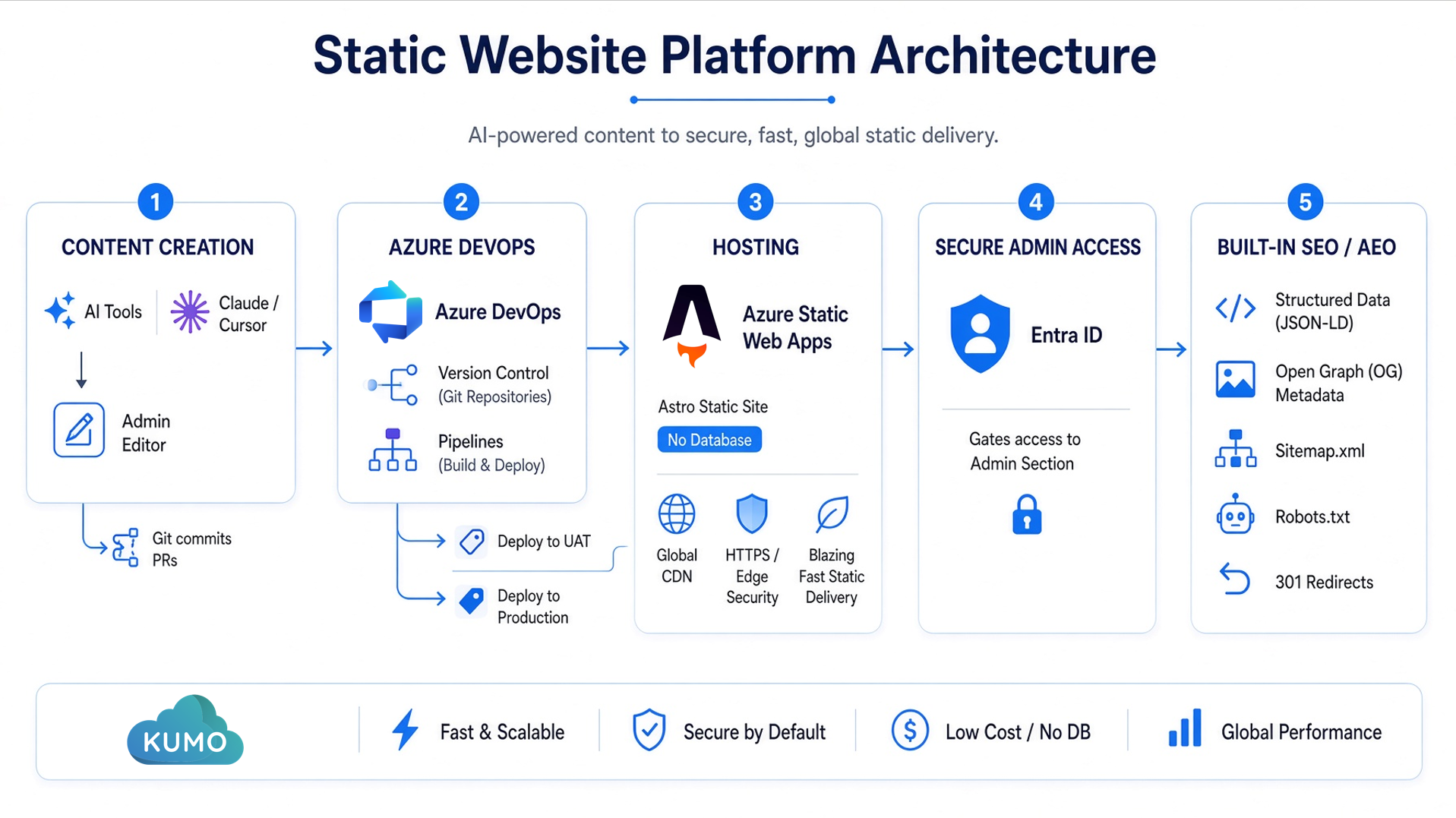
- A static web app built with Astro to render the pages (no database), hosted on Azure Static Web Apps.
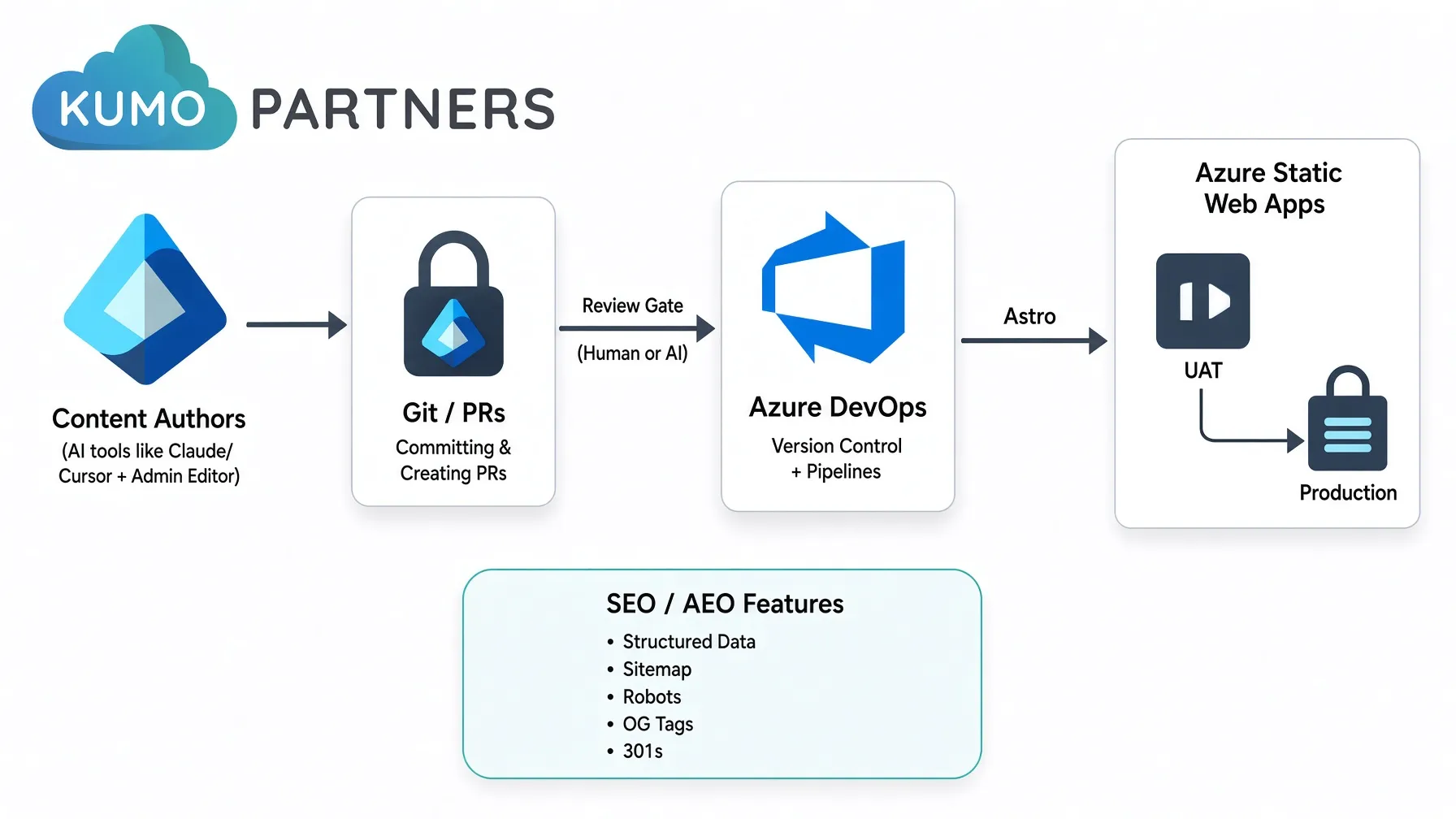
- Azure DevOps hosting the deployment pipeline, deploying to a UAT environment (Azure’s equivalent of a deployment slot for Static Web Apps) as well as production.
- DevOps also driving version control for every page. This mitigated the need for a database and gave AI models the ability to interact with the website via git. A dev can now use Claude Code, Cursor, or whatever else they want to connect to the repo, draft a blog post, and commit those changes to DevOps to deploy to UAT. Even our admin editor saves edits as a branch and pull request into
uat, so every content change (human or agent) flows through the same review gate as code. - An admin section gated behind Entra ID, so only Kumo staff can authenticate before they can touch content.
- SEO and AEO best practices baked directly into the page templates: answer-first intro blocks, FAQ sections that emit structured data for answer engines, canonical tags, and OpenGraph/Twitter cards. On top of that, an editorial focus-keyword helper in the admin flags whether your key term actually shows up in the title, description, and intro.
- A revamped sitemap that accounts for the existing pages plus the new ICPs and Offerings, an updated
robots.txt, and 301 redirects to keep everything (and our search authority) organized.
Opus to the races
With the plan in place, I had Fable do some of the preliminary work to stand up the core infrastructure and work through some tricky bugs. But once the foundation was up, keeping Fable on it was a bit like taking a rocket launcher to a knife fight, so I switched to Opus 4.8 to do the majority of the work. I call this out because each model has its pros and cons, and the cost of each model is a real factor. A good pattern is to use the more robust models for solutioning, abstraction, and complex topics, then use the lighter models as the work horses to optimize token spend. That’s how I make a Pro account work just as hard as the accounts hitting their limits every day.
The trade-offs of going static
I won’t pretend a database-free static site is the right call for every website, so here’s an honest look at where we landed with Astro and what it cost us to get there.
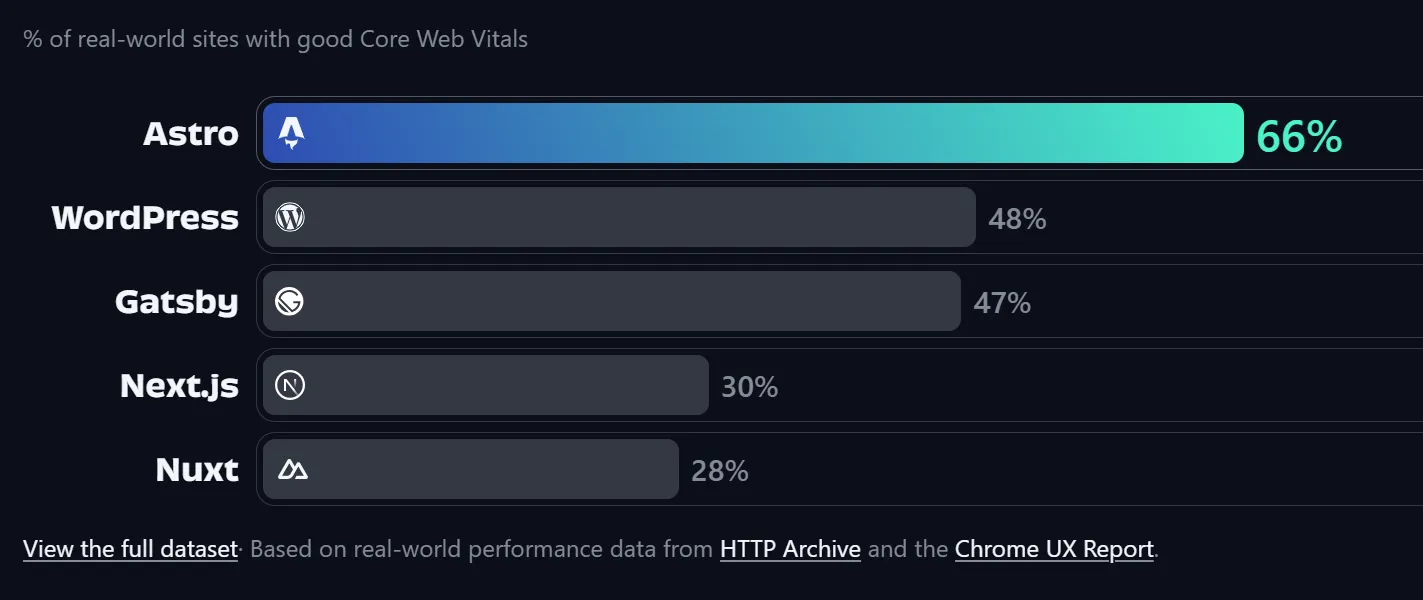
The performance jump was immediate. The whole team felt it. Pages that used to feel sluggish on WordPress are now fast and perky, and the numbers backed up what we were all noticing.
It’s amazingly cheaper. I think people can get nervous when they hear Azure anything about cost, but with this approach it’s actually cheaper. Going without a database meant we could drop WordPress “advanced hosting” from GoDaddy entirely. Azure Static Web Apps serves the whole site from a global CDN, and our assumption-based estimate puts the monthly run rate somewhere around $10 to $12, versus the $40 a month we were paying GoDaddy. Roughly a third of the cost, before you even count the plugin and SEO subscriptions we no longer need. The Static Web Apps Standard tier is a flat $9 a month for a 0.5 GB app, and honestly it’s a little absurd how much website power and speed you get for that $9.
DevOps earns its keep. Writing in markdown is a different muscle than dragging blocks around a visual builder, and it felt strange at first. But with DevOps coordinating every change and deployment behind approval gates (versioning, review, and a clean audit trail on every edit), we’re confident the trade is worth it. We gained a level of governance we simply never had in WordPress.
We had to stop the AI psychosis. This one is worth a warning. Left unchecked, the AI happily kept building, and at one point it we found ourselves starting to reinvent Elementor 2.0 inside our own admin panel. We had to consciously rein it (and ourselves) in and hold the line on a good-enough page template and editor, rather than chasing an infinite visual builder we didn’t actually need. Knowing when to say “that’s enough” turned out to be its own skill.
The one cost we’re keeping an eye on: every page is a real file sitting in hot storage, so our storage footprint grows with each page we publish. For now, our estimates show that staying comfortably manageable, but it’s the number we’ll keep watching as the site scales.
This weekend, we finally switched over
After many iterations, we’ve finally launched the new website, and the best thing is, this is just the beginning. Did we have fun doing it? Absolutely. Yasmany and I may have broken TL a little in the process of showing him version control and developing with git, but that’s the best part, so let me say it louder for the people in the back: someone with a project-management background is now able to participate in co-development (quite effectively, might I add), committing changes to the repo and participating the way a traditional developer would.
That’s the key piece to this. Generative code is continuing to break down barriers, and development is no longer a walled garden. As long as you put some good practices in place (feature branches, dev/prod deployment processes, work-item associations on your PRs), a fusion team can truly begin to build applications together.
So take a look, give us feedback, tell us what we missed, and stay tuned for more great solutions and innovations. And if you’re interested in us helping your team get set up to work this way, or want us to help you dump your own WordPress site or other third-party software, give us a shout.