The short answer: if your organization runs on Microsoft 365, 2026 is the year to plan your move off UiPath. Power Automate and Copilot Studio now cover the attended and unattended desktop automation most UiPath estates were built for. Practitioners report UiPath unattended robots at roughly 3–4x the cost of a Power Automate bot, plus an Orchestrator fee Microsoft doesn’t charge. Meanwhile, SpendHound’s contract data shows UiPath pricing for smaller customers up 74% year over year.
The bigger shift is that this is no longer RPA vs RPA. Microsoft now ships agents that run on a schedule, operate apps without selectors, and send exceptions to a person. That changes what a migration even looks like. Many bots don’t need rebuilding at all; they collapse into a few flows and agents. UiPath still makes sense for a narrow group: large automation CoEs running complex, exception-heavy case management.
This guide covers the head-to-head, what changed this year, the real cost numbers, why migration is cheaper than it used to be, and how we’d assess your bots.
Power Automate vs UiPath at a glance
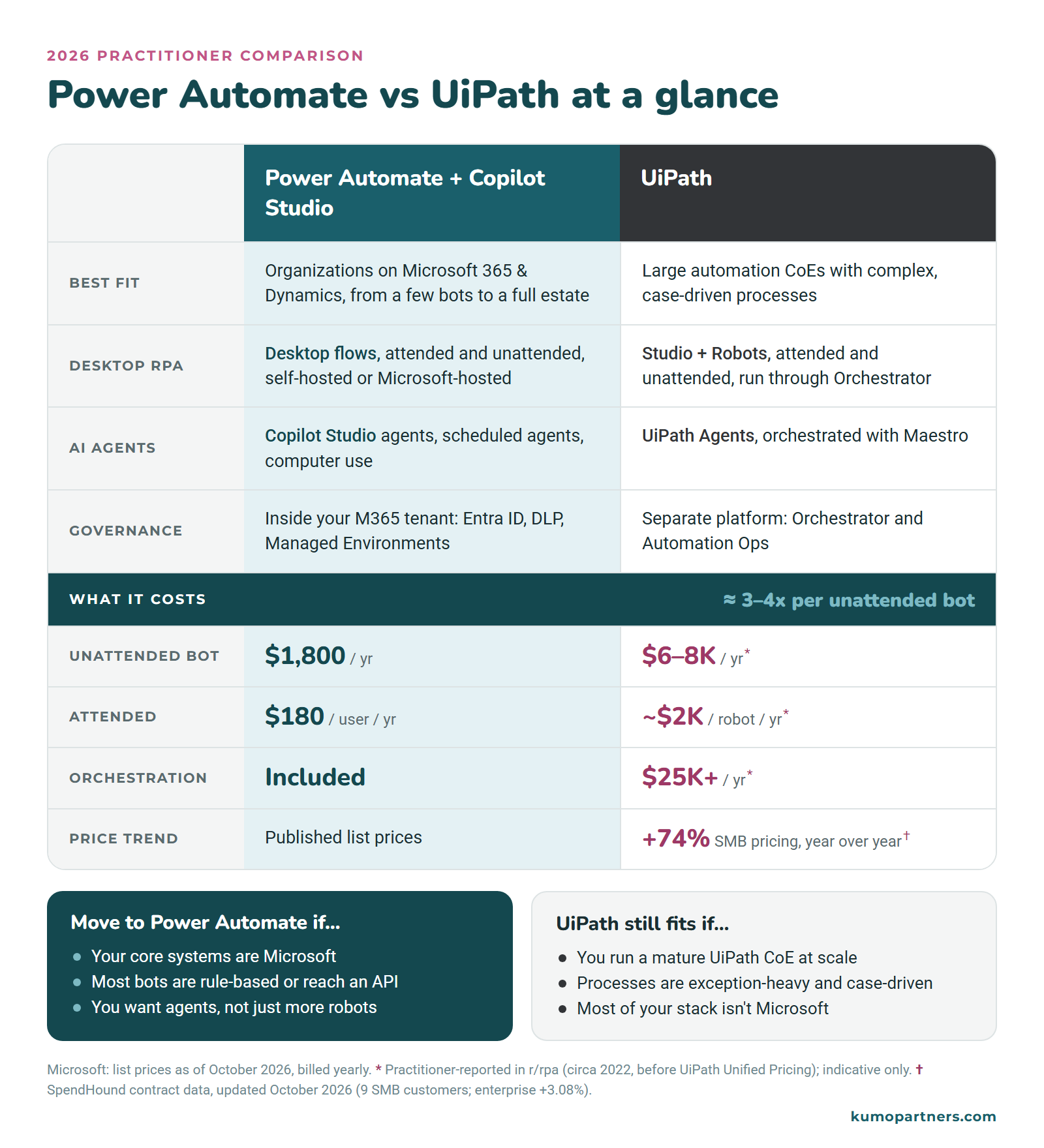
As desktop RPA tools, the two do the same core job: both record and build UI automation, and both run attended and unattended. The differences are in what surrounds that core. Power Automate runs inside the Microsoft 365 tenant you already govern, publishes its prices, charges nothing extra for orchestration, and connects directly to Copilot Studio agents. For a Microsoft organization, that usually settles it. The real questions are how much of your estate needs a robot at all, and what the move will take.
The question changed in 2026: bots vs agents
Most “UiPath vs Power Automate” articles were written when the only question was which RPA tool had better selectors. Over the last year Microsoft has shipped a different kind of automation, and it matters for anyone weighing a UiPath renewal:
- Computer use in Copilot Studio (GA). An agent operates web and desktop apps by looking at the screen, without recorded selectors. It’s built for systems that have no API, which is exactly where screen-scraping bots live today. When a button moves, the agent adapts rather than failing the run. It runs on machines you register through Power Automate, or in a Microsoft-hosted browser (preview). Computer use is always billed per agent action, so it costs more per run than a desktop flow.
- Agent flows (GA). Deterministic flows that run inside Copilot Studio and are billed on Copilot Credits, with no per-user Power Automate license needed. Automation capacity becomes a pooled credit budget instead of a count of robots.
- Scheduled and event-driven agents. Agent Builder scheduled workflows (rolling out to GA from late October 2026) and Copilot Cowork scheduled tasks let a person say “do this every Monday” without building a flow at all. That covers the light end of what attended bots do today.
- Autopilot (preview). Announced on September 25, 2026: long-running agents with their own Entra identity, governed through Agent 365. It’s Microsoft’s answer to “autonomous” automation. It’s still in preview, so don’t plan production work on it yet.
UiPath is moving the same way. Maestro orchestrates agents, robots, and people across long-running processes, and UiPath Agents compete directly with Copilot Studio. In 2025 the two vendors also shipped a two-way integration: Copilot Studio agents can call UiPath automations, and UiPath can call Copilot agents.
What this means in practice: before you ask “which tool should rebuild this bot?”, ask whether the bot should exist at all. Many bots that scrape a screen to reach a system with an API should become a cloud flow. Some that fight a brittle UI are better candidates for computer use than for a selector-based rebuild. Only what’s left needs a like-for-like RPA replacement.
Capability map: UiPath to Microsoft
| UiPath | Microsoft equivalent | Notes |
|---|---|---|
| Attended robots / Assistant | Power Automate desktop flows (Premium); Cowork scheduled tasks for light personal automation | Attended RPA is included in the $15/user/month Premium plan |
| Unattended robots | Power Automate Process or Hosted Process | One bot runs one unattended desktop flow at a time |
| Orchestrator | Power Automate machine management, work queues, Managed Environments | Agent 365 and Managed Runtime extend this to agents |
| UI automation / selectors | Desktop flows; computer use for UIs that change often | Computer use is billed per action |
| Integration Service | Cloud flows + 1,000+ connectors + Dataverse | Usually Microsoft’s strongest area for M365 and Dynamics customers |
| Document Understanding | AI Builder document processing, Copilot Studio prompt tools | Test on your own documents before assuming parity |
| UiPath Agents | Copilot Studio agents | |
| Maestro (agentic orchestration, case management) | Agent flows + Copilot Studio orchestration | Microsoft’s weakest area. No direct equivalent for exception-heavy case management |
| Unified Pricing (plan + user, robot, and Platform Unit licenses) | Per user, per bot, or Copilot Credits | See the licensing section below |
Licensing and cost
Microsoft publishes its prices. These are Power Automate list prices as of October 2026, billed yearly:
| Plan | Price | What it covers |
|---|---|---|
| Power Automate Premium | $15 per user/month | Cloud flows, premium connectors, attended desktop flows, process mining (limited) |
| Power Automate Process | $150 per bot/month | Unattended desktop flows on your own machine |
| Power Automate Hosted Process | $215 per bot/month | Unattended desktop flows on a Microsoft-hosted VM |
| Copilot Studio | Copilot Credits (prepaid or pay-as-you-go) | Agents, agent flows, computer use |
UiPath doesn’t publish prices. Under its Unified Pricing model you buy a platform plan (Basic, Standard, or Enterprise), then user licenses, Unattended Robot licenses, and Platform Units. Platform Units are consumed by things like Maestro orchestration. All of it is quoted per contract.
For a sense of what organizations actually pay, procurement platform SpendHound tracks real UiPath contracts from 55 customers. Its data puts average annual UiPath pricing at about $513,000 for enterprises and about $29,000 for smaller companies (50–1,000 employees). Prices are also rising: SMB UiPath pricing is up 73.95% year over year, and enterprise pricing is up 3.08%. SpendHound notes that finance teams are “pushing back on UiPath license costs” (SpendHound, updated October 2026). For context, $513,000 a year would cover about 280 unattended Power Automate bots at list price.
Component by component, the gap is roughly 3–4x. UiPath customers comparing notes in r/rpa reported these figures (as posted around 2022, before Unified Pricing, so treat them as indicative):
| Component | UiPath (practitioner-reported) | Microsoft (list, Oct 2026) |
|---|---|---|
| Unattended robot | $6,000–8,000 / year | $1,800 / year (Process) |
| Hosted unattended robot | ~$10,000 / year | $2,580 / year (Hosted Process) |
| Attended robot | ~$2,000 / year | $180 / year per user (Premium) |
| Orchestrator | $25,000+ / year, required for unattended, plus ~$10,000 per dev/staging environment | No separate charge |
| Developer seat | $3,000–5,000 / year (Studio) | Included with Premium; the desktop designer is free |
One commenter’s setup (Orchestrator, three unattended robots, two attended, two test robots, and four Studio licenses) cost about €40,000 a year. The same footprint at Power Automate list prices is about $10,000: five Process bots and six Premium users. The Orchestrator fee alone accounts for much of the difference.
How to compare cost properly: don’t line up one robot against one robot. Price the whole estate:
- List every process with its run frequency and whether it runs attended or unattended.
- Work out how many processes really need an unattended bot and how many could run as cloud flows (no bot needed) or under users’ existing Premium licenses.
- Count concurrency. On the Microsoft side, each Process license runs one unattended flow at a time, so ten bots that must run simultaneously need ten licenses. Ten bots that can queue behind each other might need two or three.
- Add what you already own. Microsoft 365 E3/E5 and Dynamics licenses include standard Power Automate cloud flows, and many organizations already pay for Premium seats they barely use.
The per-bot gap is large on its own. The rest of the savings come from finding out that a large share of the estate doesn’t need a dedicated robot at all.
Should you switch? A SWOT view
We’re a Microsoft partner, so weigh this accordingly. Here’s an honest view of moving a UiPath estate to Microsoft, from the point of view of an organization already on Microsoft 365.
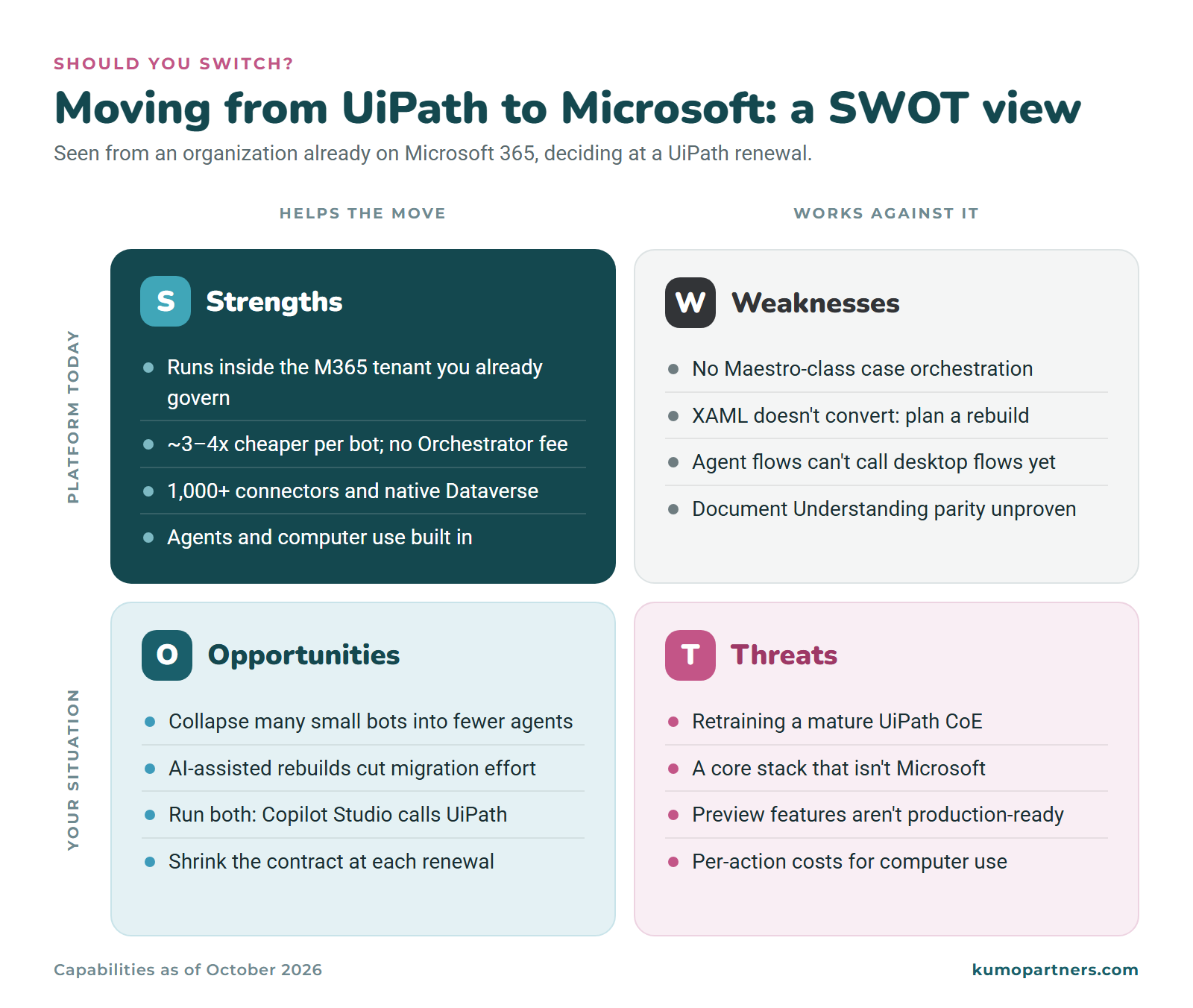
Strengths: unattended bots cost roughly a quarter as much, there’s no separate orchestration fee, your existing tenant’s governance (Entra ID, DLP, Managed Environments) covers bots and agents, and you may already own some of the licenses.
Weaknesses: there’s no Maestro-class case orchestration yet, XAML gets rebuilt rather than converted, and agent flows have to reach desktop flows through a cloud flow.
Opportunities: many small bots can collapse into fewer flows and agents rather than being rebuilt one by one, and AI-assisted development shortens the work that remains. Copilot Studio can call UiPath automations, so you can move in phases and shrink the contract at each renewal.
Threats: retraining a mature UiPath CoE can outweigh the licensing savings, a non-Microsoft core stack erodes most of the advantage, and preview features (Autopilot, hosted computer use) aren’t ready for production.
If the right-hand column describes you better than the left, keep UiPath for the complex work and move only the simple processes.
What a bot-to-agent move looks like
Here’s a pattern we recently modernized for a client. It started on Power Automate desktop flows, but the same type of bot runs on UiPath in thousands of organizations, and the move would look the same.
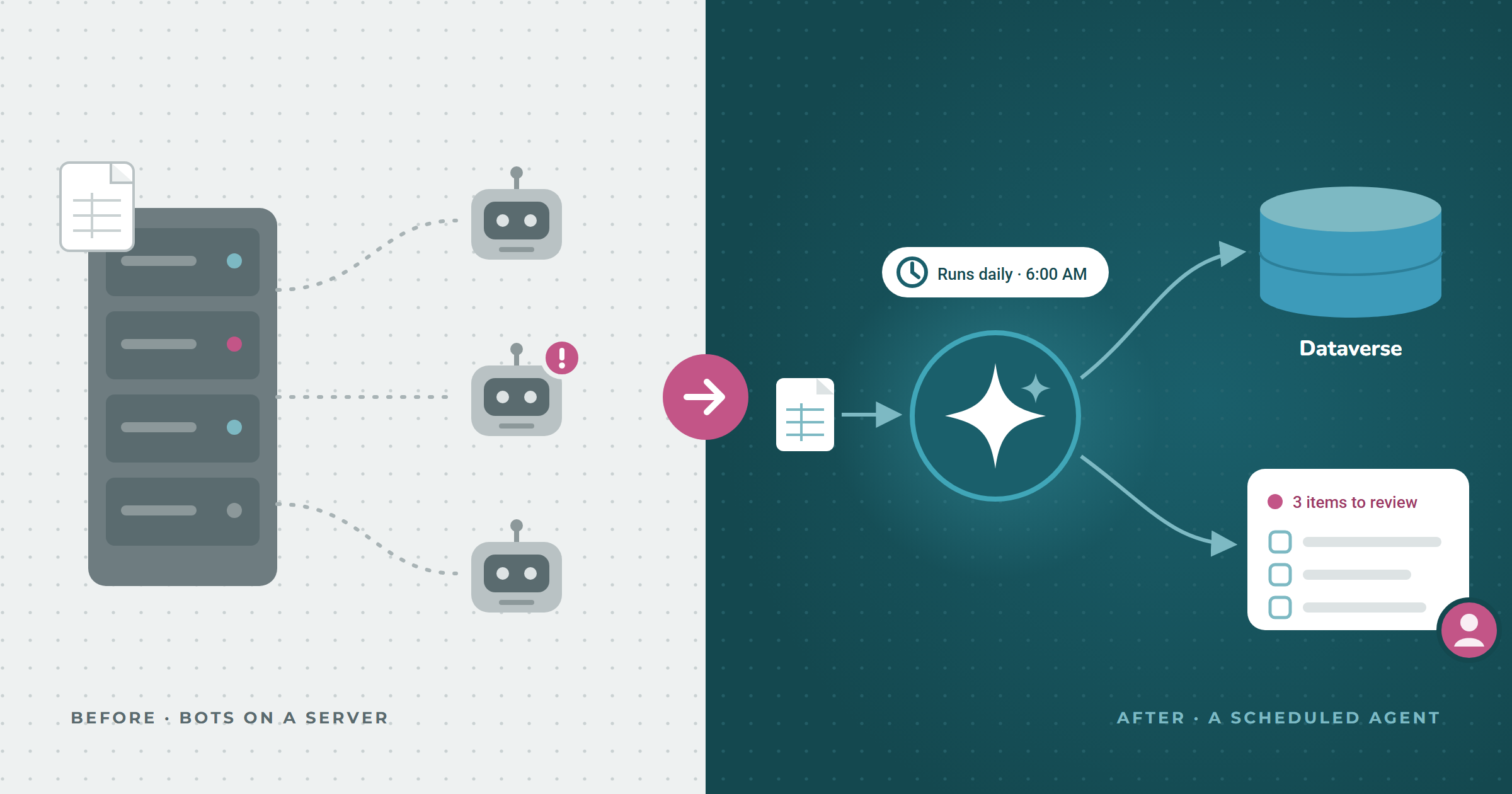
Before: several desktop flows ran on an on-premises server. Another system’s job dropped Excel exports onto that server. The bots picked up each file, applied parsing rules, split it into separate record sets, and loaded the results into Dataverse. It was textbook RPA: it depended on one machine, and it failed whenever a file arrived in a slightly different shape.
After: the export now lands in SharePoint instead of on a server. An agent runs on a daily schedule, picks up the file, applies the same parsing and splitting logic, and writes the records to Dataverse. It also generates a visual summary of each run and publishes it to SharePoint as an HTML page, a new SharePoint feature in preview this fall. When a file has problems, the agent no longer fails or buries them in a run log. The summary shows the team which items need human review, so someone handles the handful of exceptions instead of rerunning the whole job.
What changed: the important difference isn’t the tool. It’s that the automation now reports exceptions to a person instead of just succeeding or failing. Deterministic steps stay deterministic, and the agent handles the messy rows and tells a person about them. That’s the question to ask of every bot in a UiPath estate: does this still need a robot, or does it need a scheduled agent that knows when to ask for help?
Why migration costs less than it used to
The licensing gap isn’t new. What kept organizations on UiPath was the cost of rebuilding. One of the same Reddit commenters put it simply: with 100+ processes, “migration will be work.” Industry estimates commonly put licensing at only a quarter to a third of an RPA program’s total cost (one 2026 guide puts it at 25–30%). The rest is building and maintaining bots, and maintenance is a known pain: in a Pega survey, 87% of organizations reported bot failures.
Two things have changed that math:
- You don’t rebuild one-for-one anymore. Many UiPath estates are hundreds of small task automations (UiPath itself describes attended robots as helping “individual users with small and repetitive tasks”), such as a file move here or a data entry step there. They don’t need hundreds of replacements. Related bots collapse into a single flow or a scheduled agent, as in the example above, and the agent sends exceptions to a person instead of each bot hard-coding every edge case.
- AI speeds up what’s left. AI-assisted development turns existing workflow definitions into documentation, a process inventory, and first-draft rebuilds that engineers then review and test. We don’t rely on automatic conversion tools. Their accuracy claims (for example) are self-reported, and selectors and Citrix-hosted bots still need hands-on work. But the work that used to make migration “exorbitant” now goes much faster.
This is how our AgentDesk team approaches automation: an agentic architecture team that rebuilds processes with quality, and quickly, instead of porting bots line by line.
How we’d decide: an RPA bot assessment
When a client facing a UiPath renewal asks us whether to switch, we don’t start with a feature comparison. We go through their processes one at a time and sort each into one of four groups:
- Move: rule-based desktop automation that rebuilds well as Power Automate desktop flows.
- Modernize: bots that scrape screens to reach a system with an API. These become cloud flows, Dataverse integrations, or a computer use agent where no API exists.
- Retire: bots nobody depends on anymore. Every estate has some.
- Keep: complex, exception-heavy processes where UiPath is still the better tool.
The result is a renewal decision based on your actual processes, not on two vendors’ comparison pages. If you’re within a year of a UiPath or Automation Anywhere renewal, send us your process list and we’ll run the assessment for you.
Learn more about our platform consolidation work.
FAQ
Can Power Automate replace UiPath?
For most rule-based attended and unattended automation, yes. Power Automate desktop flows cover the same RPA patterns, and cloud flows plus Copilot Studio cover integration and agents. The gaps are exception-heavy case orchestration and very large estates run by an established UiPath CoE.
Is Power Automate cheaper than UiPath?
Yes, usually by a wide margin. Practitioners report UiPath unattended robots at $6,000–8,000 a year, compared with $1,800 for a Power Automate Process bot, plus a $25,000+ Orchestrator fee that Microsoft doesn’t charge. That’s roughly 3–4x per bot, and SpendHound’s contract data shows SMB UiPath pricing up 74% year over year. Rebuild effort is the bigger variable, so compare your whole estate against your actual renewal quote.
Can Power Automate do unattended RPA?
Yes. The Power Automate Process plan ($150 per bot/month) runs unattended desktop flows on your own machines, and Hosted Process ($215 per bot/month) runs them on Microsoft-hosted VMs. Each bot runs one unattended flow at a time.
What’s the difference between Power Automate desktop and UiPath?
Both are selector-based desktop RPA tools with recorders and attended and unattended modes. UiPath Studio has deeper tooling for professional RPA developers. Power Automate for desktop is easier for Microsoft 365 teams to pick up and is managed in the same admin center as the rest of the Power Platform.
Is UiPath being replaced by Copilot?
For many organizations, increasingly yes. Copilot Studio agents now handle scheduled work, exceptions, and UI automation through computer use, which covers much of what UiPath bots were bought for. The exception is complex case orchestration, where UiPath’s Maestro still leads. If you aren’t ready to move everything, Copilot Studio can call UiPath automations, so you can migrate in phases.
What is Copilot Studio computer use?
A Copilot Studio capability that lets an agent operate websites and desktop apps by reading the screen and acting on it the way a person would, without recorded selectors. It’s useful for systems with no API, and it adapts when the interface changes. It’s billed per agent action.
Related reading: What is an AI agent, and why the distinction matters · Copilot Studio vs Azure AI Foundry vs built-in Copilot · Creating cross-system workflows