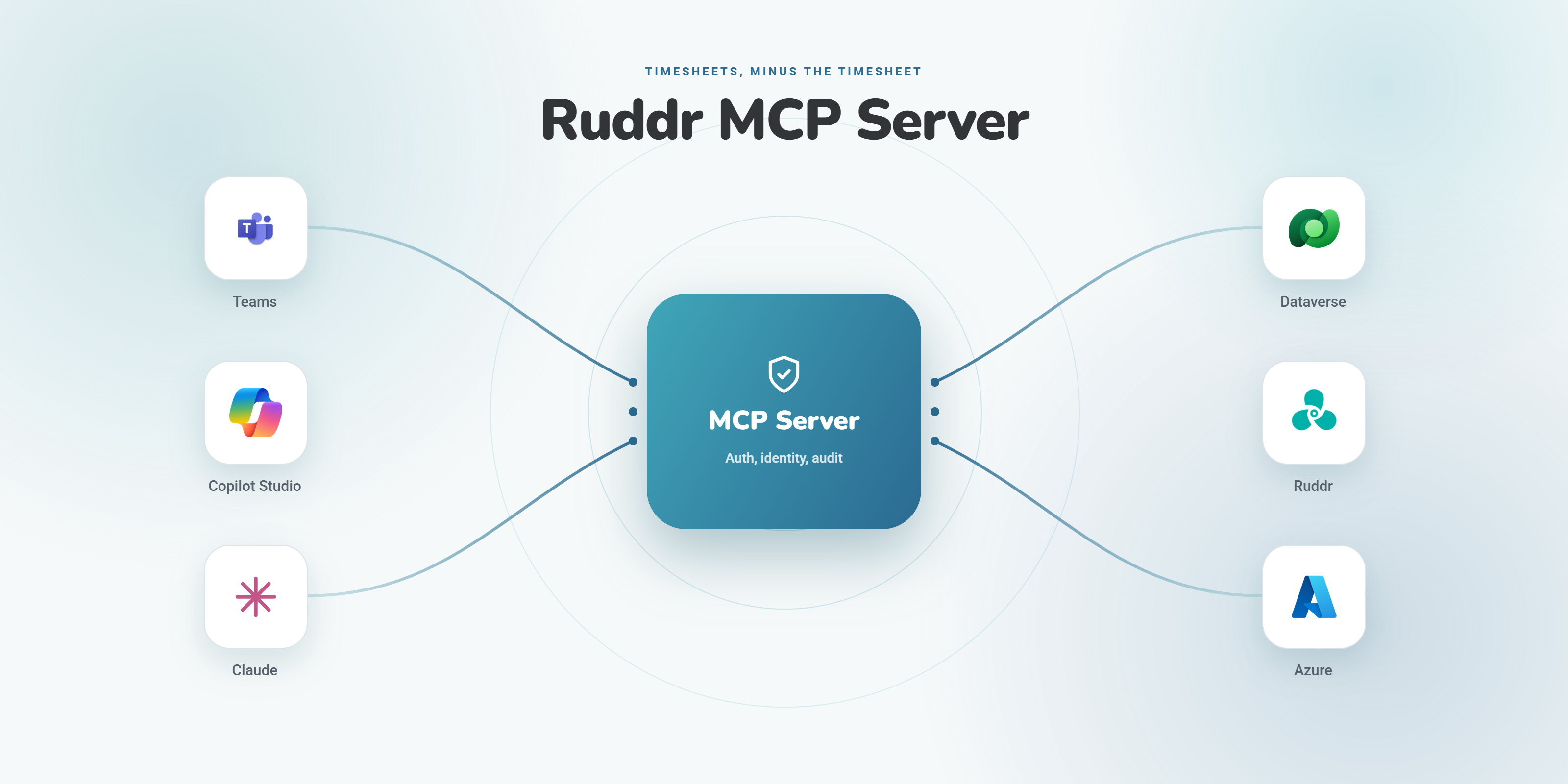
Continuing our 2026 campaign of building in the open, this next solution kicks it up a notch. It tackles an even bigger pain we have been facing as an organization, and one that every professional services firm knows well: timesheets.
For the Love of Timesheets
Anyone who bills hours knows that tracking time is never simple. At its best, you are fully staffed and jotting a quick note through the week, confident your work is already captured in DevOps. At its worst, you are spending an hour every week assembling a four-dimensional puzzle out of notes, emails, and meetings, just trying to get everything documented.

So naturally, we started throwing around an idea we had been dying to test for quite some time: “What if an agent could just figure out your timesheet for you?”
AI Envisioning Workshop
To qualify the idea further, we ran an internal workshop to think through which use cases would actually be helpful. It turns out there are a lot.
- It could draft for you:
“Please submit 2 hours to Leadership for our Weekly L10 call today."
"Here is a picture of my notes from yesterday, help me create time entries.” - It could provide guidance and stay aware of project permissions:
“What projects can I submit to?"
"Which project should I submit my 2 hours of HR training to?” - It could pull in your work data:
“Please review my meetings and sent emails from last week and provide draft entries to submit.”
- It could give admins additional capabilities:
“Show me everyone’s timesheet for last week and flag who hasn’t submitted yet.”
- But it also needed guardrails:
The agent has to know who the user is and limit them to only viewing and editing their own time entries, and to only submitting to projects they have access to. It should not be too easy. People still need to be accountable for the time they submit, so the agent helps the user draft their entries, but the user still submits the timesheet themselves.
Calculating an ROI Target
One thing we were able to roughly measure during the workshop: most folks were spending anywhere from 30 to 90 minutes on their timesheets every week. Across a team of 5, that is roughly 4 to 5 hours a week; across a team of 30, it is 20 to 30 hours. Our goal was to cut that time by at least 25%.
At that point we knew this was worth tackling, and we started building the backlog.
Applying our Solution AI Decision Framework
Kicking off discovery, the first job was weighing the pros and cons of how to approach the agent. Copilot Studio is the ideal candidate for a structured agent like this, but given the API requirements we also vetted Azure AI Foundry. Foundry is excellent for more robust modeling, hosting an AI query pass-through, or running richer search against larger data models and more complicated integration points. So we ran the requirements through our decision framework to land on a preliminary architecture:
- Ruddr (ruddr.io) is our timesheet management software, and it has a very robust API. The one caveat is that the API has no per-user authorization: it only offers an admin key that grants system-wide access, not user-scoped access.
- Because of that, calling the API directly from the agent was never going to be ideal, so we pivoted to building our own MCP server to wrap the Ruddr API. That also let us define our own tools, parameters, and rules rather than exposing the raw API surface.
- We considered having the MCP server call the Ruddr API directly, but we still needed the authorization logic to sit on an intermediary data layer. Thankfully, we already had a solution that syncs our Ruddr data into Dataverse, so the MCP server could read that copy as read-only reference data and resolve projects and people without hitting Ruddr on every request.
- With the data and authorization layer sorted, we could confirm the design: a Copilot Studio agent connected to our MCP server.
- It also meant identity could be handled cleanly through Entra ID. Every request carries an Entra ID token, and the MCP server itself validates that token and resolves who the caller is on the server side, so access is always scoped to the actual person rather than to anything the agent passes in.
Solution Implementation
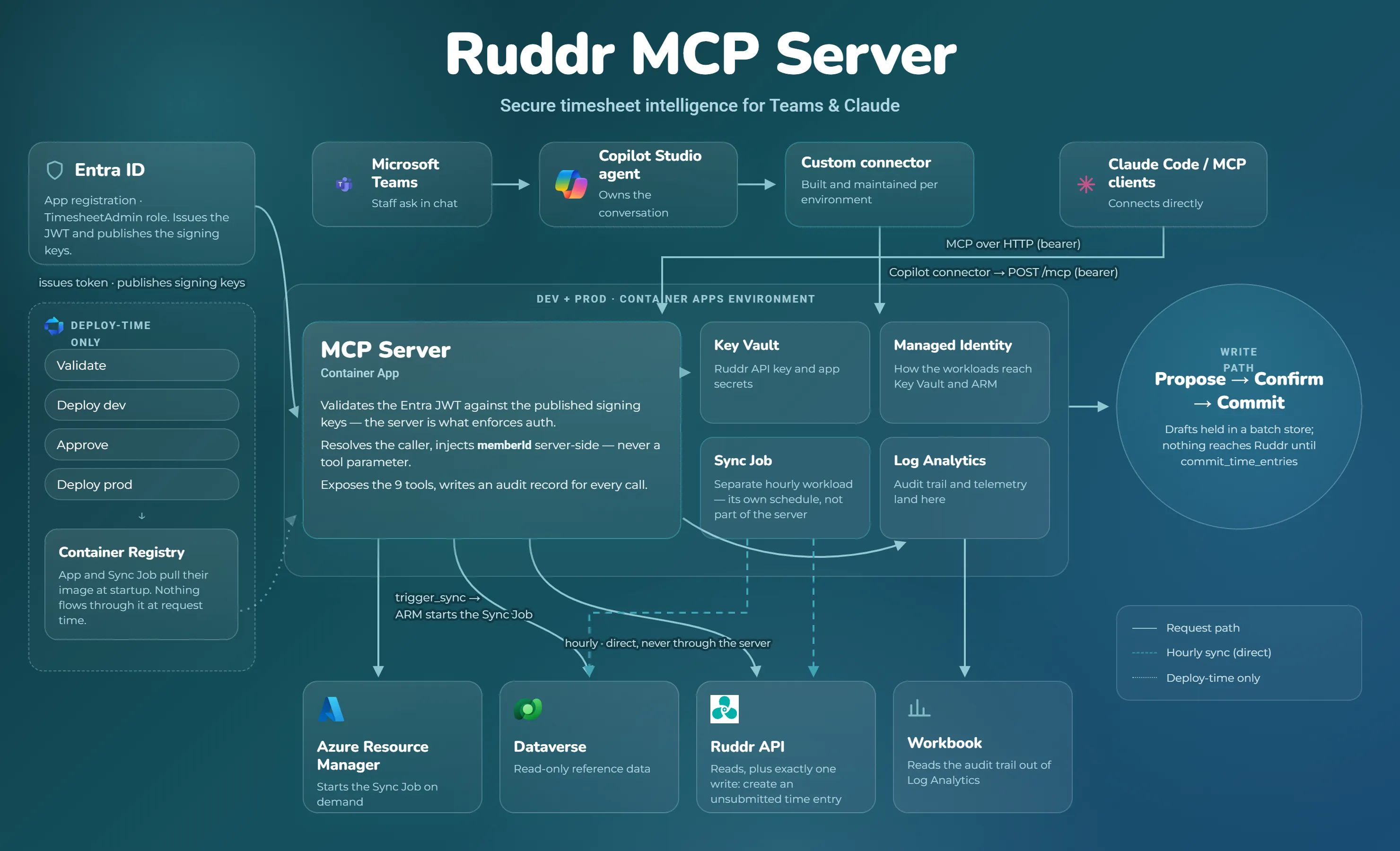
After running the criteria through the decision framework, we felt confident moving into implementation. It took a few sprints, but we brought the solution together, leaning on a lot of the standard practices we use to drive anything to production.
- One Server, Any Agent - For most of the team the agent lives in Microsoft Teams, where a Copilot Studio agent owns the conversation and reaches the MCP server through a custom connector (built and maintained per environment). The same server also speaks plain MCP over HTTP, so Claude Code and other MCP clients can connect directly to it. Both paths hit the same
/mcpendpoint with a bearer token, which means there is exactly one place where the rules live. - Work IQ connectors - These connectors give the agent access to the user’s Outlook email and meeting data. This is a key piece: it is what lets the agent go beyond simple drafting and actually review what you did across the week to derive the work behind each entry.
- MCP server on Azure Container Apps - The MCP server itself is a Node.js application hosted on Azure Container Apps, running as both a dev and a prod environment. It is the component that enforces auth: it validates the Entra ID token against the published signing keys, resolves the caller, and injects that member identity server-side rather than trusting it as a tool parameter. From there it exposes nine tools for the agent to call and writes an audit record for every single call.
- Azure DevOps pipelines - To keep a healthy ALM story, we run a dev and a prod instance of everything, and every deployment flows through Azure DevOps pipelines with an approval gate between the two. Those pipelines provision the Azure resources from Bicep files, and the container image is pulled from the registry at startup rather than sitting in the request path.
- The supporting Azure cast - Entra ID is the identity backbone: it issues the tokens, publishes the signing keys the server validates against, and holds the permission groups (Admin, Manager, Staff) that shape what each caller can do. Key Vault holds the Ruddr API key and app secrets, and a managed identity is how the workloads reach Key Vault and Azure Resource Manager. Log Analytics collects the audit trail and telemetry, and an Azure Workbook reads that audit trail back out for reporting.
Natural Language to Structured Query
One thing the diagram above does not highlight is how we process the user’s prompt and model the query. There are really two sides to it: the agent model out front, and the server behind it.
The agent model - The model orchestrating the Copilot Studio agent does the first chunk of work. It is responsible for interpreting the user’s request in whatever form it arrives (text, image, speech, or another language like Spanish) and turning that into a structured call to the server.
The server - The server exposes a propose_time_entries tool that accepts a structured payload. So a user saying “3 hours on Client A yesterday doing the migration” arrives as { dateHint: "yesterday", hours: 3, projectHint: "Client A", notes: "doing the migration" }.
The scoring model - From there we lean on a scoring method rather than pure agentic reasoning, which keeps project matching deterministic and predictable. It weighs two things: first, the project hint is matched against known projects using string conditions; second, projects the user has logged to recently are given more weight, on the assumption that those are what they are actively working on week to week.
| Condition | Score |
|---|---|
| Project code exact | 1000 |
| Project code contains query | 500 |
| Client name exact | 400 |
| Client prefix match (either direction) | 300 |
| Client contains | 200 |
| Project name exact | 180 |
| Project name contains | 100 |
Nothing is written until you say so - Matching a project is only half the story. Every draft moves through the same path: propose, confirm, then commit. The proposed entries sit in a batch store, and nothing touches Ruddr until a commit_time_entries call. Even then, the only write the server ever makes to Ruddr is to create an unsubmitted time entry. The agent can do all of the assembly work, but the timesheet itself is still yours to review and submit.
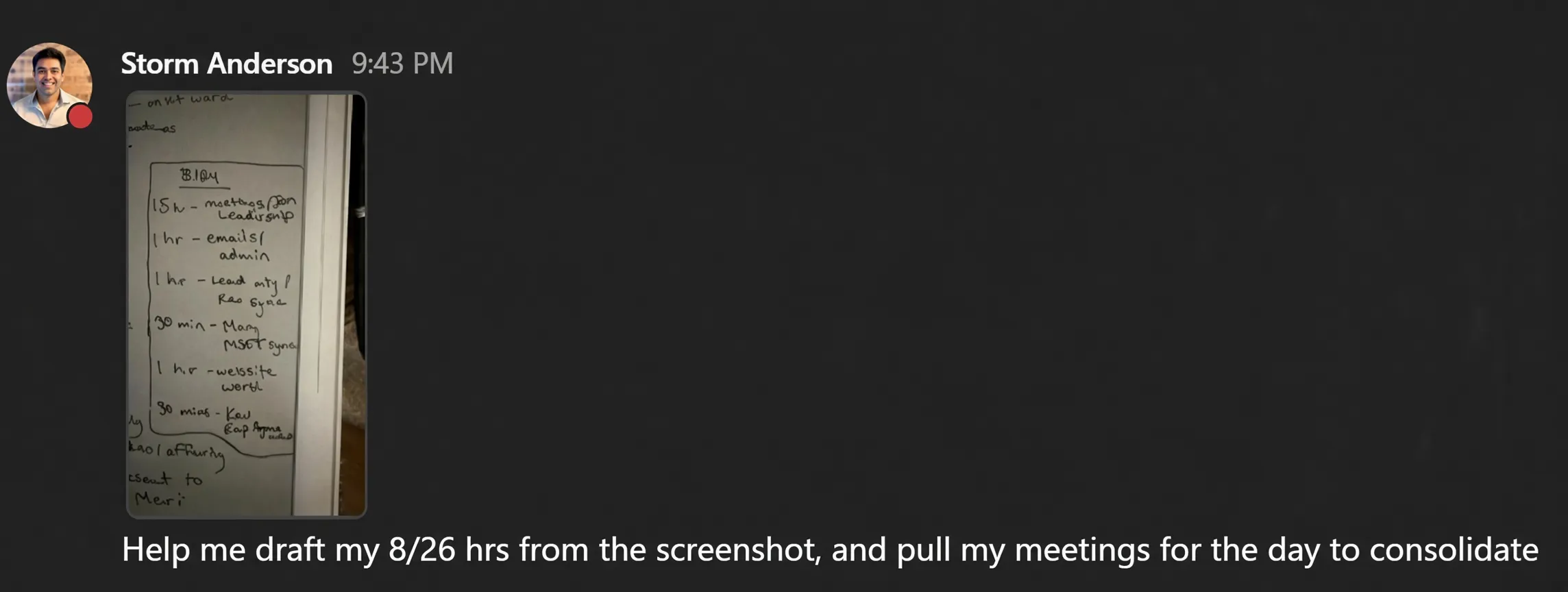
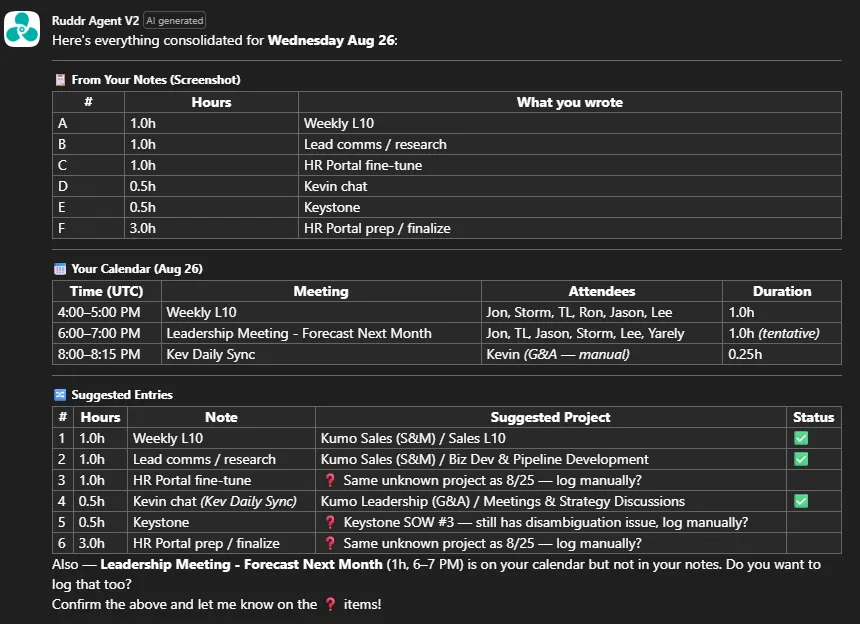
To see it end to end: a user drops in a photo of their handwritten notes and asks the agent to draft the day and pull the day’s meetings to consolidate. The agent reads the notes, cross-references the calendar, scores each item against known projects, and comes back with a consolidated set of proposed entries to confirm.
Results
Rolling this out to the team, I have been humbled to watch the time savings come back. It might seem minor, but being able to use any medium (text, speech, or images) to provide the context is a huge benefit. We went a step further and built a time-savings model on top of some measured assumptions and real usage telemetry.
The benefit? Roughly 34.5% to 53.8% time savings.
Key Observations
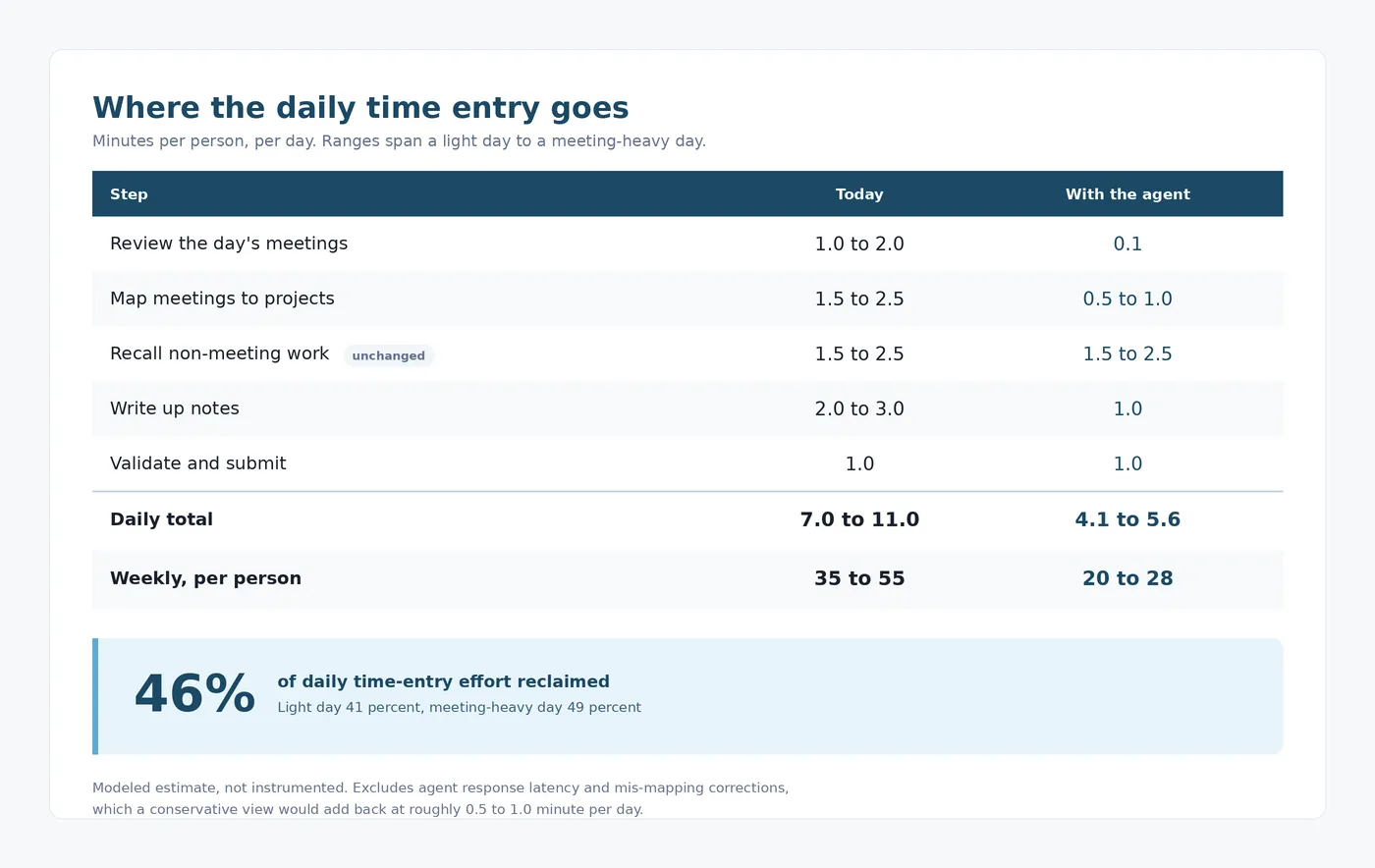
- Recall is where the agent helps most. Reviewing raw meetings on a calendar is a chore on its own, and when you have four or five meetings a day it gets overwhelming fast. Having the agent pre-emptively draft them to the right projects and tasks was the single largest benefit.
- For non-meeting work, there was not much difference. At the end of the day, that work still has to come from notes, emails, and tacit knowledge, so the agent could not save much time when the work still had to be recollected from scratch. That did surface an opportunity, though: more disciplined DevOps task tracking could become a data source the agent draws on.
In Closing
The biggest takeaway is that an MCP server is what gives you the flexibility and tool enforcement that make an API genuinely robust for an agent to engage with. By building this in Azure, we kept costs low, folded it into our existing development framework, and got to run our AI framework in real time for ourselves, exactly the way we do for clients every day.
If your team bills hours and dreads the weekly timesheet scramble, this is the kind of internal tooling that pays for itself quickly. It is also a good reminder that the same MCP patterns we use to ship agents for clients are the ones we put to work on ourselves first.